Copilot CLI vs VS Code: When I Use Each
I'm a video producer, not a developer. But over the past year, GitHub Copilot has become one of my most-used tools. Not for writing code in the traditional sense, but for automating tedious tasks, analyzing data, doing research, and building little utilities that save me hours every week.
If you're in media, marketing, or any creative field and you've dismissed "developer tools" as not for you, I'd encourage you to reconsider. You don't need to know how to code. You just need to know what you want to accomplish. Copilot handles the rest.
I use GitHub Copilot constantly, but I've landed on a pretty clear split between the CLI and VS Code versions. They're different tools for different jobs, and knowing when to reach for which one has made me way more efficient.
GitHub Copilot in VS Code: When Context is King
This blog you're reading? It's a VS Code project. I've got a posts folder, a drafts subfolder, images, stylesheets. GitHub Copilot in VS Code can search across all of it, edit files in place, and keep that context throughout the session. CLI can read files too, but VS Code's integration is deeper.
When I'm working on something like this, I need VS Code to see the full picture. It knows my template structure. It can reference other posts to match the tone. It understands which drafts exist and which have already been published. It can push changes to GitHub when I'm ready.
That file and folder awareness is everything for larger projects. When I say "create a new draft post about X," it knows exactly where to put it, what template to use, and how to format the metadata. I'm not explaining my project structure every time I start a conversation.
Copilot CLI: Quick Hits and Skill Building
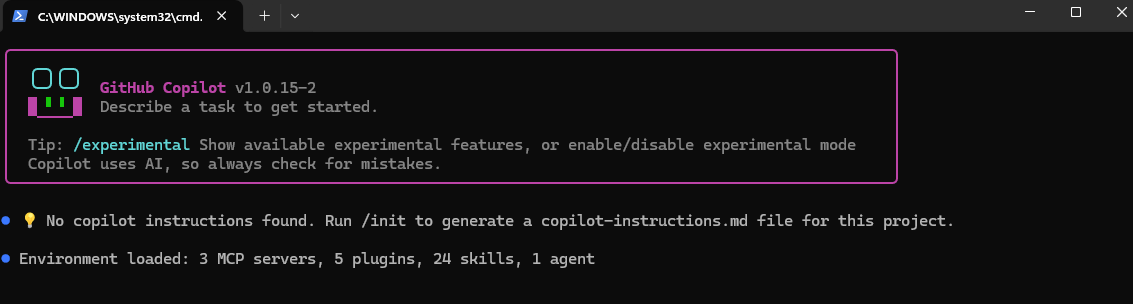
Copilot CLI is my scratchpad. When I have a quick question or want to prototype something fast, I'm not opening VS Code for that. I just ask.
But here's the thing that surprised me: CLI became my incubator for building skills. When I'm iterating on something new, working through problems step by step, the CLI's conversational flow is perfect. I can ask, test, refine, ask again. It's faster than context-switching in a full IDE.
Two skills I built this way now live in our devrel-studios plugin.
The Skills I Built
VTT Metadata Generator
This started as me asking the CLI how to parse VTT files. Then how to extract chapter markers from conversational flow. Then how to generate YouTube-optimized titles. Each question built on the last.
Now it's a full skill that takes raw video transcripts and generates publish-ready YouTube metadata: three title options optimized for clicks and search, a full video description with summary and key topics, and timestamped chapter markers pulled directly from the conversation flow. It even writes the results back to Azure DevOps work items automatically. (If you're curious why a video team uses ADO, I wrote about that here.)
YouTube Livestream Chat Analyzer
Same story. Started with me asking CLI how to download YouTube chat comments. Then how to run sentiment analysis. Then how to extract geographic data.
The skill now downloads chat comments from any livestream and delivers sentiment breakdowns (positive, neutral, negative percentages), common themes viewers discussed, and geographic reach showing where people tuned in from around the world. For playlists, it compares across streams, tracking sentiment trends, audience growth, recurring viewers, and how topics evolve episode to episode.
Both started as CLI conversations.
MCP Servers: The Real Power-Up
Both VS Code Copilot and Copilot CLI can use MCP servers, and I use three of them religiously.
Azure DevOps
Finding work items, querying project data, linking things together. When I need to track down what's in flight or connect my work to tickets, the ADO MCP server handles it without me leaving Copilot. It's open source and easy to set up: github.com/microsoft/azure-devops-mcp.
Playwright
This one surprised me with how useful it's become. I use it to edit PowerPoint decks programmatically. I also use it to scrub through websites when I need to match speakers on internal lists with their public bios, pulling names, titles, and headshots from conference sites or LinkedIn. Grab it here: github.com/microsoft/playwright-mcp.
Work IQ
Finding links buried in Teams chats is a nightmare. The Work IQ MCP server lets me search through conversations to dig up that one URL someone shared three weeks ago. Game changer for anyone drowning in message threads. Check it out: github.com/microsoft/work-iq.
The Split
Here's my mental model:
- VS Code Copilot: Multi-file projects, anything needing folder context, pushing to GitHub
- Copilot CLI: One-off questions, learning something new, building and testing ideas iteratively, quick scripting
If I had to estimate, I spend about 80% of my time in Copilot CLI and 20% in VS Code. The CLI handles most of my day-to-day questions and quick tasks. VS Code comes out when I need that project context or I'm building something that spans multiple files. Knowing which tool to grab for which job has made both of them more useful.
Comments