Livestreaming Before It Was Cool
I've been streaming since before it was cool. Back when "going live" meant hauling hardware like the Spinnaker, a dedicated encoding box that cost more than a car and required a degree in broadcast engineering to troubleshoot. This was before OBS existed. Before StreamYard. Before your laptop could encode H.264 without catching fire.
Now everyone has a streaming setup. Your phone is a broadcast studio. Twitch made gaming livestreams a legitimate career. But the fundamentals haven't changed, and understanding them helps explain why different tools exist and why platforms behave differently.
How Livestreaming Actually Works
Let me break down the technical side, because understanding this helps explain why different tools exist and why platforms behave differently.
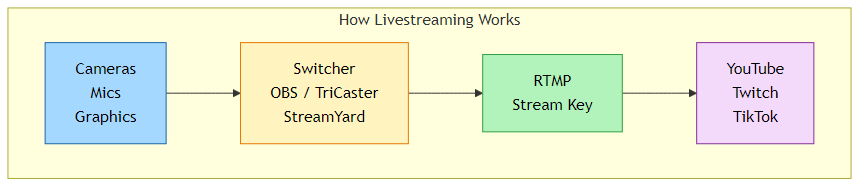
At its core, livestreaming has three components:
- Production/Mixing: Combining your cameras, graphics, screen shares, and audio into a single program output
- Encoding: Compressing that video into a format that can travel over the internet
- Delivery: Sending that encoded stream to a platform that distributes it to viewers
RTMP: The Protocol That Runs Everything
Almost every streaming platform uses RTMP (Real-Time Messaging Protocol) to receive your stream. When you set up a livestream on YouTube, TikTok, or anywhere else, you get two things:
- Stream URL (RTMP URL): The address where you're sending your video
- Stream Key: Your unique identifier that tells the platform which stream this belongs to
Your encoding software takes your program output, compresses it, and pushes it to that RTMP URL with your stream key. The platform receives it, transcodes it into multiple quality levels, and distributes it to viewers through their CDN.
Simple in concept. A thousand things that can go wrong in practice.
The Tools: Mixing and Delivery
Here's where it gets interesting. The tools we use for livestreaming serve dual purposes: they're both production switchers (mixing your sources) AND delivery systems (encoding and sending to platforms).
Hardware Switchers: The Professional Tiers
Production switchers exist in tiers. At the very top, you have broadcast networks. ESPN, NFL productions, the Super Bowl, the Olympics. These use equipment from Ross Video, Grass Valley (their K-Frame and Kayenne systems), and Sony. We're talking switchers that cost hundreds of thousands of dollars, with dedicated control surfaces, multiple M/E (mix/effects) banks, and engineering teams to operate them.
A step down, you have solutions like the NewTek TriCaster and Blackmagic ATEM. This is where we live. The TriCaster is an all-in-one system: multiple camera inputs, graphics, virtual sets, audio mixing, recording, AND streaming output. All in one box. The ATEM line from Blackmagic offers incredible value, especially the ATEM Mini series which brought broadcast-quality switching to a price point that made everyone do a double-take.
For our needs, TriCaster and Blackmagic hit the sweet spot. We're not producing Monday Night Football, but we need more than a laptop running OBS can reliably deliver for mission-critical events. The Mini and 2 Elite models can do a lot.
Software Switchers: OBS, vMix, Wirecast
OBS (Open Broadcaster Software) democratized livestreaming. Free, open-source, and surprisingly capable. It turned any decent computer into a streaming workstation.
OBS can pull in multiple sources (cameras, screen captures, browser windows, NDI feeds), mix them with scenes and transitions, and push the output to any RTMP destination. It's what most individual creators use, and honestly, it's powerful enough for many professional applications.
vMix and Wirecast are the paid alternatives with more features.
Cloud-Based: StreamYard, Riverside
StreamYard changed the game for remote guests. Instead of having everyone install software and configure audio, you send them a browser link. They join, their camera shows up in your production, done.
It handles the mixing in the cloud and delivers directly to platforms. Lower complexity, lower control, but dramatically easier for distributed teams. Riverside takes a similar browser-based approach but focuses on high-quality local recording for podcasts and remote interviews. This became essential during COVID when suddenly everyone needed to produce content from home.
Platform Wars: Where to Stream
Not all platforms are created equal. Each has quirks, limitations, and different audiences.
YouTube: The King of VOD
YouTube won. I'll explain why in a moment, but let me first say: 90% of our viewership comes from YouTube.
The killer features:
- Instant VOD: When your stream ends, it immediately becomes a searchable video that lives on your channel forever
- Search and Discovery: YouTube's algorithm actually surfaces livestream recordings to new audiences
- DVR: Viewers who join late can rewind and catch up while the stream is still live
- Built-in AI Captions: Auto-generated captions (with about an 8-second delay live)
The workflow: Create your stream, grab the Stream URL and Stream Key from the Live Control Room, plug them into your encoder, and go. Auto-stop and DVR should be enabled. Captions through embedded 608/708 if you're using professional captioning.
Twitch: What Could Have Been
During COVID, we went all-in on Twitch. It made sense at the time. Twitch was THE live platform. The chat culture was established. The community features were great.
But here's what killed it for us: discoverability.
On Twitch, when your stream ends, it becomes a VOD that's hard to find. The search is weak. The algorithm favors currently-live content. Your stream happens, your community watches, and then it disappears into the void.
YouTube's streams live forever. They get recommended. They show up in search results months later. For educational and technical content, this permanence matters.
We still respect Twitch for what it does well (gaming, entertainment, real-time community), but for our use case, YouTube became the defacto home.
TikTok: The 15-Minute Problem
TikTok Live is weird. The platform only generates your stream key 15 minutes before you go live. You cannot plan ahead. You cannot test your connection. You show up, hope the key appears, and scramble to get it into your encoder before your scheduled start time.
This is chaos for professional productions. Great for spontaneous "going live now!" energy. Terrible for planned events.
X (Twitter): Low Latency, Time Limits
X has surprisingly low latency. Your stream reaches viewers faster than most platforms. But there's a catch: if you set a start and end time, the stream WILL end at that time even if your event runs over. Build in buffer time or your broadcast gets cut off mid-sentence.
LinkedIn: The 4-Hour Cap
LinkedIn Live maxes out at 4 hours. If your event is longer, you need to split it into multiple separate streams. Plan accordingly for all-day conferences.
Instagram: The Mobile-First Platform
Instagram Live is designed for phones. Getting professional production into Instagram requires workarounds. It's great for influencer-style content, rough for broadcast-quality shows.
Why Live?
With all these complications, why bother with live at all? Why not just record everything and post polished videos?
Interactivity Changes Everything
Chat. Q&A. Real-time reactions. The energy of knowing people are watching RIGHT NOW.
When you're live, the conversation is real. Viewers ask questions. You answer them. The content adapts to the audience. This creates a connection that produced video can't replicate.
The "imperfection" is part of the appeal. Natural conversations get captured. The tangents that would get edited out of a produced video become the best moments of a livestream.
Production Efficiency
Here's the dirty secret: livestreaming is actually more efficient than produced video.
When you make a produced video, you can edit. And because you CAN edit, you WILL edit. You'll tweak the pacing. Re-record that section that wasn't quite right. Spend three hours color grading. Obsess over the music choice. The video takes forever because you're trying to make it perfect.
With a livestream? It's done when it's done. The session ends, YouTube has your VOD, and you move on.
We can jam-pack a full day of streaming. Four sessions, eight hours of content, all going straight to VOD. That same amount of produced content would take weeks.
The Evolution Continues
From the Spinnaker to OBS to cloud-based production, streaming has come a long way. The barriers keep dropping. The tools keep improving. Anyone can go live from anywhere.
But the fundamentals haven't changed: get your signal mixed, get it encoded, get it delivered. Whether you're using a $50,000 TriCaster or a free OBS setup, you're still doing the same three things.
And the reason to do it live hasn't changed either. Real conversations. Real connection. Real efficiency.
Some things never change.
Comments